Matrix networks and announce rooms
Some trackers announce new torrents in a Matrix room instead of an IRC channel. autobrr has its own Matrix client built in, so it can follow those rooms without any extra software.
A Matrix network in autobrr is one account on one homeserver, plus the announce rooms it listens to. It works like an IRC network: autobrr parses every announce in the room and runs it through your filters.
Supported indexers
| Indexer | Homeserver | Announce room |
|---|---|---|
| Blutopia | https://matrix.watchtower.pm | #blu-announce:matrix.watchtower.pm |
Prerequisites
You need an account on the tracker's homeserver. Follow the tracker's own instructions to get one; for Blutopia the homeserver is matrix.watchtower.pm.
It's a good idea to sign in once with a Matrix client like Element first. That confirms the account works and lets you see the announce room.
Setup
1. Add the indexer
Go to Settings > Indexers, click Add new and pick the indexer, for example Blutopia. Fill in the indexer settings, such as the RSS key, and save.
autobrr creates the Matrix network and its announce rooms for you. If you already have a Matrix network on the same homeserver, the new rooms are added to it instead, so several indexers can share one account.
If the network can't be created, the indexer is still saved and autobrr shows an error. Add the network yourself under Settings > Matrix with Add new, using the homeserver and room from the table above.
2. Log in
Go to Settings > Matrix. The new network is enabled but shows not logged in, with a Log in button.
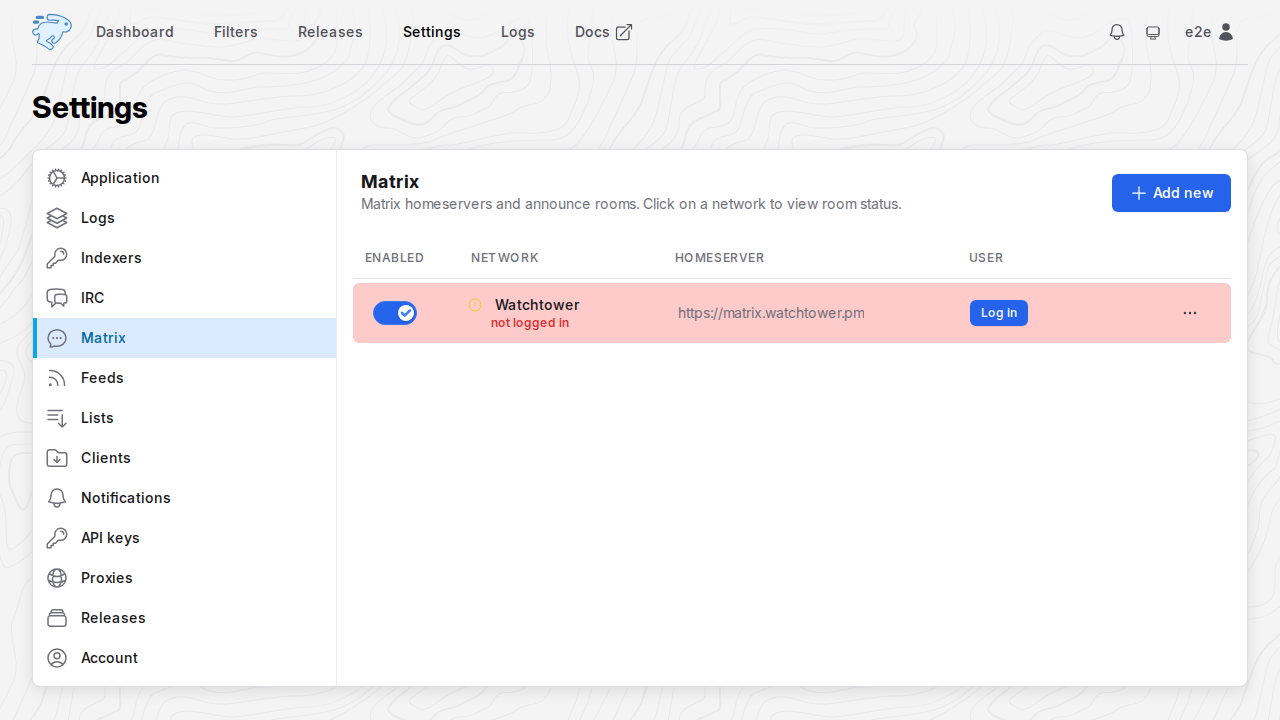
Click Log in on the network. The same login is also in the network's menu (...) and in the Account section of its edit panel.
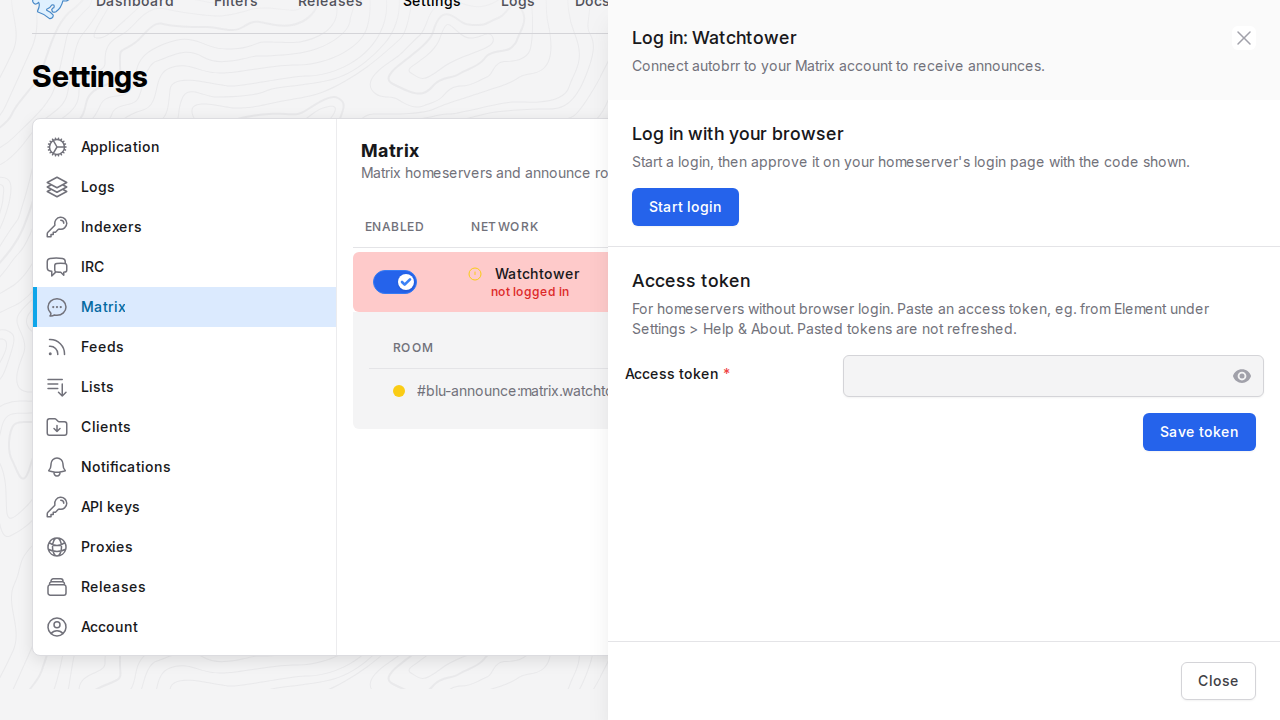
- Click Start login. autobrr shows a code and a link to your homeserver's login page.
- Open the link, sign in with your Matrix account and approve the request with the code.
- The panel switches to Logged in as @you:server within a few seconds. Close it.
The network connects and joins its rooms on its own. You don't need to restart anything.
If you close the panel before approving, open Log in again: it shows the same code until the code expires.
autobrr stays logged in: it renews its access token in the background, so you only do this once.
The login shows up as a new session called autobrr in your Matrix account's list of sessions or devices.
Log in with an access token
If your homeserver doesn't support browser login, Start login fails with Could not start the login, and Settings > Logs shows could not discover matrix authorization server. In that case paste an access token in the Access token section of the same panel and click Save token. autobrr checks the token against the homeserver before it saves it.
In Element you can find the access token of a session under Settings > Help & About, in the Advanced section.
- A pasted token is never renewed. If it expires, or you log out of the session it belongs to, autobrr stops and asks you to log in again.
- Homeservers that use the Matrix Authentication Service, like
matrix.watchtower.pm, hand out tokens that expire after a few minutes. Use Start login on those. - Treat the token like a password: it gives full access to your Matrix account.
3. Check that it's working
In Settings > Matrix a working network has a green dot, and your Matrix user is shown next to it. Click the network to see its rooms:
- Joined since is when autobrr joined the room.
- Last announce is the last time an announcer posted in the room.
Click View on a room to open its message log. It shows every new message in the room as it arrives, including messages autobrr doesn't parse. The log starts when the network connects and keeps the last 1000 messages. Restarting autobrr clears it.
Network settings
Open the menu (...) on a network and choose Edit.
The Account section at the top shows the Matrix user the network is logged in as, and whether it logged in with the browser or an access token. Its Log in and Log out buttons apply right away; they don't wait for Save, and Cancel doesn't undo them.
| Setting | Description |
|---|---|
| Name | Display name of the network. |
| Enabled | Turns the network on or off. |
| Homeserver | Base URL of the homeserver, for example https://matrix.watchtower.pm, without a username, password, query or fragment. Changing it logs the network out, because the account belongs to the old homeserver. |
| Rooms | Rooms to join, as an alias like #room:server or a room ID like !id:server. They are added for you when you add an indexer, so only change them if you know what you're doing. |
The network menu also has:
- Log in opens the login panel.
- Restart reconnects the network.
- Log out removes the network's login from autobrr, the same as in the Account section. It doesn't end the session on the homeserver. To do that, remove the autobrr session in your Matrix account settings.
- Delete removes the network and its rooms.
How announces are handled
- autobrr only parses messages from the indexer's announce bot. Announce rooms are public, so messages from anyone else are shown in the room log but never parsed.
- Every Matrix message is treated as one announce, even when it spans several lines.
- Edited messages are ignored, so an edit never grabs a release twice.
- autobrr doesn't catch up on missed announces. When a network connects, it starts with new messages and skips the room's history. After a short connection drop it picks up where it left off.
Re-processing an announce
Each line in the room log has a re-process button. It sends that message through the indexer's parser and your filters again, as if the announce bot had just posted it. This is useful for testing a filter against a real announce.
Troubleshooting
The error is shown under the network or room name in Settings > Matrix. When a network needs a new login, it also shows a Log in button.
| Message | What to do |
|---|---|
| not logged in | The network has no login yet. Log in. |
| access token was rejected, log in again | The homeserver no longer accepts the token, for example because the session was removed or a pasted token expired. Log in again. |
| refresh token was rejected, log in again | autobrr couldn't renew its login, for example because the session was removed. Log in again. |
| no enabled rooms | Every room on the network is disabled. Enable one under Edit. |
| no indexer definition uses this room | The room isn't an announce room of any added indexer, so its messages are not parsed. |
| could not join any room | Check the room names under Edit, and that your account is allowed in the rooms. |
A room that fails to join shows the homeserver's error under its name. autobrr retries it on its own, first after 30 seconds and then less often, up to every 10 minutes, while the other rooms keep working.
If the login panel shows Login failed: login code expired, the code wasn't approved in time. Click Start login again for a new one.
For other connection problems, check the logs under Settings > Logs. autobrr retries on its own with a growing delay, up to 5 minutes between attempts.
- Encrypted rooms are not supported. Tracker announce rooms are public and unencrypted.
- Matrix networks connect directly; proxies are not supported yet.